08 November 2008, 17:17 UTC#1
So I'm taking video production right now and we run Macs using Final Cut Pro. Yesterday I edited for the first time in FCP, working on a commercial we had shot. I'll post the commercial on here after I get some feedback from my teacher. I caught on to FCP pretty quick and I really liked it. I would like to edit the ABV DVD in the program, but I was told you can't hook up an external HD formatted for a PC, to a Mac. First, I was wondering if this was true, and secondly, if there's any suggestions to how I could get around this problem? Re-capturing all the footage is absolutely out of the question, seeing as tapes have been lost/destroyed, taped over before I learned it was a bad thing, and because some of the skate footage/alternate angles are files sent to me, uploaded by someone else.
I was hoping someone on here could possibly help me out. Anyone who hasn't messed around in FCP, I recommend it!
08 November 2008, 17:43 UTC#2
Me edited this in FCP with an external drive with all the footage uploaded and stored for a pc, if that helps at all.
http://www.youtube.com/watch?v=kgF8L67PZkwedit: I noticed with really long clips, 10mins+ the audio sync falls outta place
08 November 2008, 17:59 UTC#3
1.
http://www.youtube.com/watch?v=DDHGP2MGCzA2. So you just hooked up the HD and had no problems? My teacher must have lied...
3. How do you compress your videos out of FCP to be YouTube-ready.
08 November 2008, 18:22 UTC#4
Nope never had problems hooking up the hd. I just got a 25 second clip with good sound and quality into 5.2 megs and %95 of the clip was shot in hd using these video settings, do your own thing for audio I never do anything special for it.
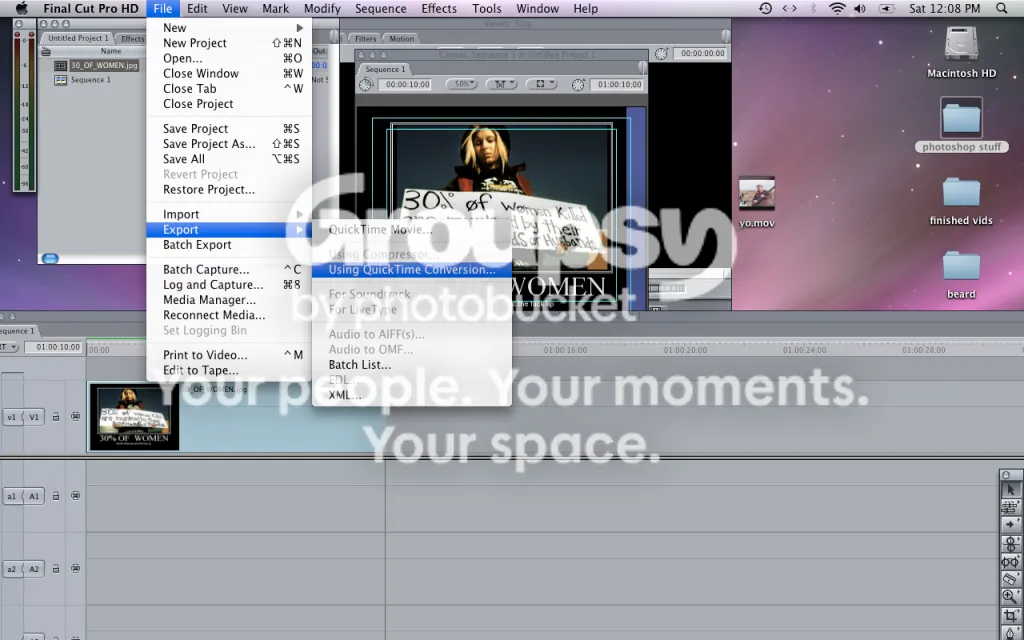
pretty self explanatory.
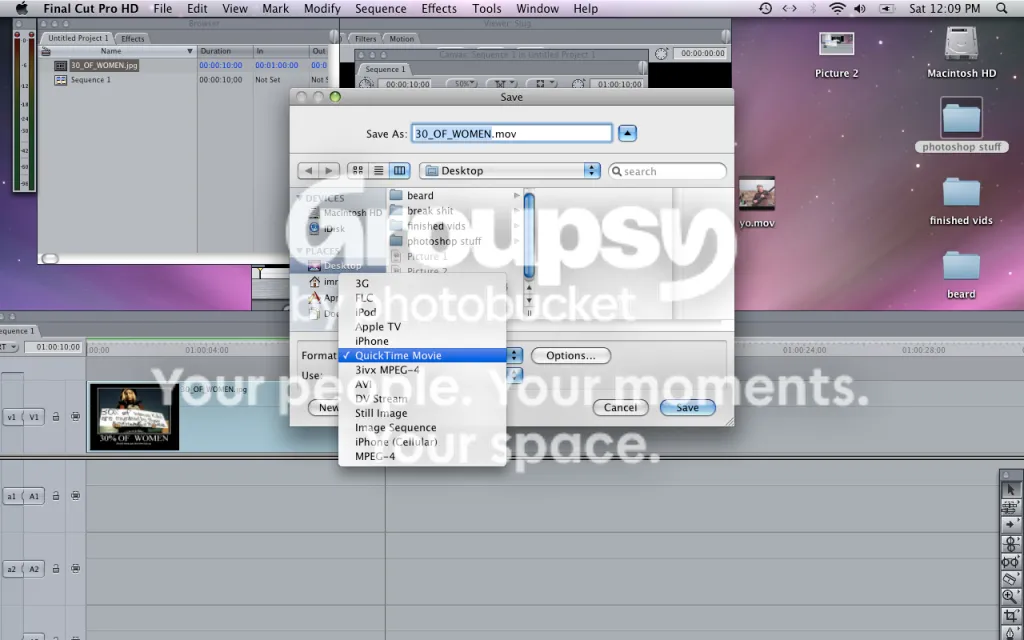
after selecting quicktime movie, click the "options" button to send you to the movie settings box.
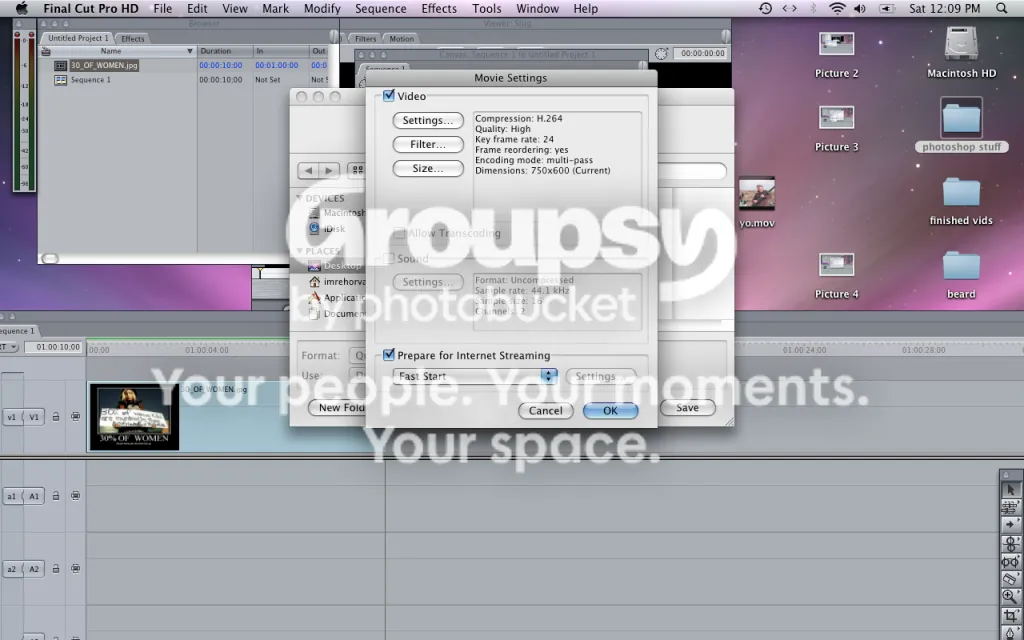
settings menu, click on "settings"
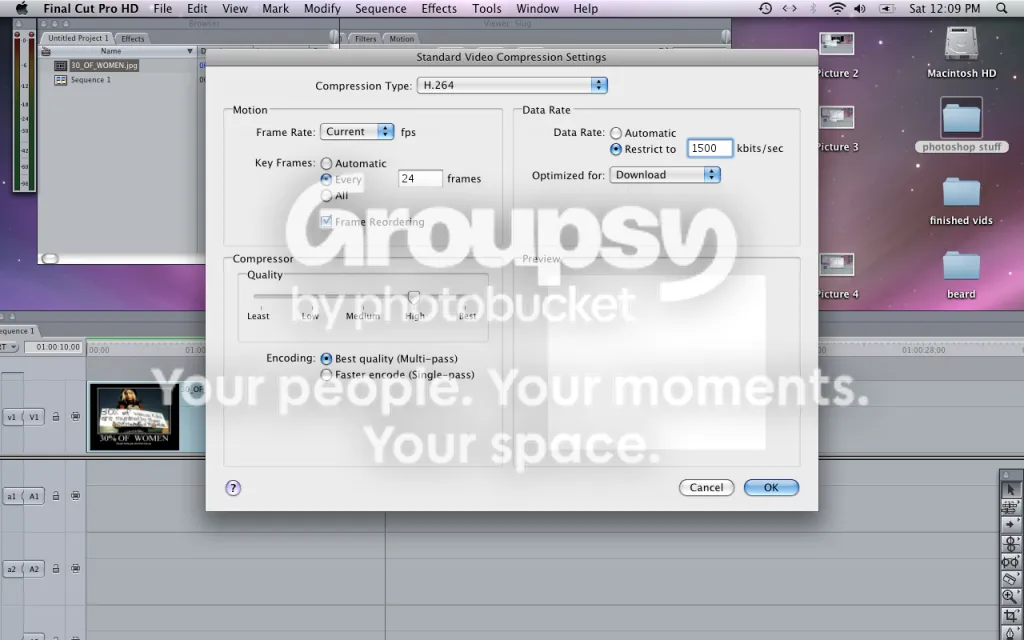
video compression options, go back to "movie settings" and click on "size"
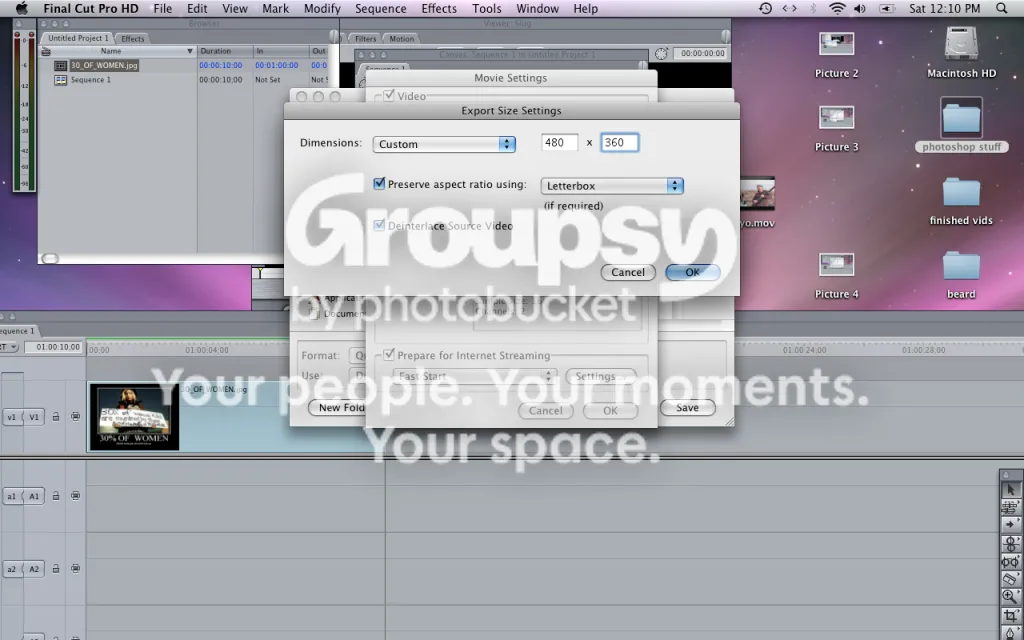
de-interlace if you need to, use same size as shown, preserve aspect ratio.
audio shit
save that shit
Hope this helps you, these settings also work in imovie hd and imovie 08.
yo
08 November 2008, 18:30 UTC#5
Thanks, and stop sayin' "yo" so much.
08 November 2008, 18:42 UTC#6
lol dumb habit.
08 November 2008, 18:49 UTC#7
Your HD will probably not work if it's formatted to a PC.
Just google to see how to get the footage off. I mean all you would need to do is transfer the footage back onto the pc desktop, and then somehow transfer that to a mac computer/hardrive, which Im sure is doable with wirless networks or some shit. Im sure theres billions of ways to do it, just ask a computer geek, or google it.
Some hardrives (usually the smaller ones, and flash sticks) work on both mac and pc, so you could just transfer the shit a few gigs at a time.
08 November 2008, 19:00 UTC#8
Thanks Dex.
09 November 2008, 08:55 UTC#9
This is just a common misconception.
A HDD formatted for Windows (NTFS) will be able to be READ and pulled from on a Mac, but can not be written to.
A HDD formatted for a Mac (Don't remember the name for it) will work on the Mac and the Mac only. Windows will not even recognize it as a device.
A drive of any kind formatted in FAT32 will be able to be read by and be written to by both Windows and Mac OS.
The reason lots of small drives/flash drives/memory cards are workable on both Mac and Windows is because they are generally formatted in FAT32 due to the small capacity. NTFS takes up more space on the drive, so to minimize that loss on smaller capacity drives, FAT32 is used.
Hopefully you took the time to read the wall I've written and hopefully I've answered your question. After working with FCP in my production classes, I never wanted to go back to anything else either.
09 November 2008, 13:52 UTC#10
QUOTE(EBJustin @ Nov 9 2008, 10:55 AM)
↑
This is just a common misconception.
A HDD formatted for Windows (NTFS) will be able to be READ and pulled from on a Mac, but can not be written to.
A HDD formatted for a Mac (Don't remember the name for it) will work on the Mac and the Mac only. Windows will not even recognize it as a device.
A drive of any kind formatted in FAT32 will be able to be read by and be written to by both Windows and Mac OS.
The reason lots of small drives/flash drives/memory cards are workable on both Mac and Windows is because they are generally formatted in FAT32 due to the small capacity. NTFS takes up more space on the drive, so to minimize that loss on smaller capacity drives, FAT32 is used.
Hopefully you took the time to read the wall I've written and hopefully I've answered your question. After working with FCP in my production classes, I never wanted to go back to anything else either.
Heres the science behind what I said.
09 November 2008, 16:20 UTC#11
Sounds like I'm set then. I have all the footage already on my external HD. I won't need to put anything from the Mac onto it, so I should be all good.
